Bootcamp Web
03. Listing Chirps
In the previous step, we added the ability to create Chirps. Now we're ready to display them!
Retrieving the Chirps
Let's update the index action of our ChirpController to pass Chirps from every user to our chirps.index page.
<?php

namespace App\Http\Controllers;

use App\Models\Chirp;
use Illuminate\Http\Request;

class ChirpController extends Controller
{
    public function index()
    {
        return view('chirps.index', [
            //
            'chirps' => Chirp::with('user')->latest()->get(),
        ]);
    }

    // ...
}
Here we've used Eloquent's with method to eager-load every Chirp's associated user's ID and name. We've also used the latest scope to return the records in reverse-chronological order.
Returning all Chirps at once won't scale in production. Take a look at Laravel's powerful pagination to improve performance.
Connecting users to Chirps
The Chirp's user relationship hasn't been defined yet. To fix this, let's add a new "belongs to" relationship to our Chirp model:
<?php

// ...

class Chirp extends Model
{
    // ...

    public function user()
    {
        return $this->belongsTo(User::class);
    }
}
This relationship is the inverse of the "has many" relationship we created earlier on the User model.
Displaying The Chirps
Next, update the chirps.index view so we can list all Chirps:
<x-layouts.app :title="__('Chirps')">
    <section class="w-full lg:max-w-lg mx-auto">
        <div class="flex items-center space-x-2 justify-between">
            <x-text.heading size="xl">{{ __('Chirps') }}</x-text.heading>

            <a href="{{ route('chirps.create') }}" class="btn btn-primary btn-sm">{{ __('Write') }}</a>
        </div>

        <div class="mt-6 hotwire-native:mt-0 card hotwire-native:rounded-none hotwire-native:mb-20 bg-base-100 divide-y divide-base-200 shadow">
            @each('chirps.partials.chirp', $chirps, 'chirp')
        </div>
    </section>
</x-layouts.app>
Finally, let's create a chirps.partials.chirp Blade partial. This partial will be responsible for displaying an individual Chirp:
<div class="p-4 flex space-x-4">
    <div>
        <x-profile :initials="$chirp->user->initials()" />
    </div>

    <div class="flex-1">
        <div class="flex justify-between items-center">
            <div>
                <span class="text-base-content font-medium">{{ $chirp->user->name }}</span>
                <small class="ml-2 text-sm text-base-content/50">{{ $chirp->created_at->diffForHumans() }}</small>
            </div>
        </div>
        <p class="mt-1 text-base">{{ $chirp->message }}</p>
    </div>
</div>
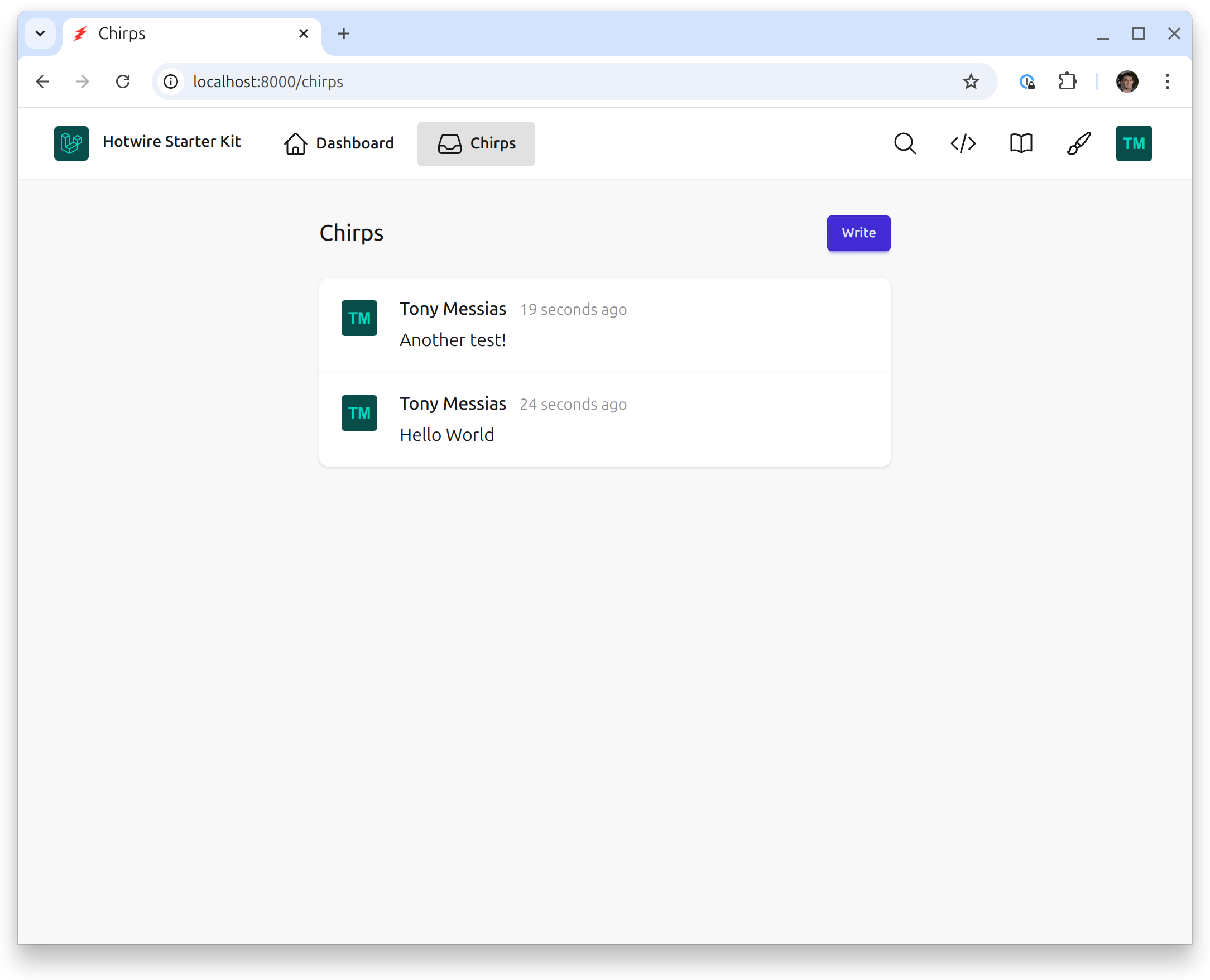
Now take a look at your browser to see the message you Chirped earlier!
Extra Credit: Relative Dates
Right now our chirp.blade.php partial formats the date as relative, but that's relative to the time it was rendered, not the current time. We can make it auto-update without requiring a page refresh using the Local Time Laravel package.
First, let's install it via Composer:
composer require tonysm/local-time-laravelThen, install the JS package:
php artisan importmap:pin local-timeNow, let's create our own lib setup file at libs/local-time.js:
import LocalTime from "local-time"
LocalTime.start()
Next, update the libs/index.js file to import it:
import "libs/turbo";
import "libs/local-time";
import "controllers";
Then we can use this package's component in our chirps.partials.chirp Blade partial to display relative dates using the newly installed HTML elements:
<div class="p-4 flex space-x-4">
    <div>
        <x-profile :initials="$chirp->user->initials()" />
    </div>

    <div class="flex-1">
        <div class="flex justify-between items-center">
            <div>
                <span class="text-base-content font-medium">{{ $chirp->user->name }}</span>
                <small class="ml-2 text-sm text-base-content/50"><x-local-time-ago :value="$chirp->created_at" data-turbo-permanent /></small>
            </div>
        </div>
        <p class="mt-1 text-base">{{ $chirp->message }}</p>
    </div>
</div>
If you refresh the page, you should see the date string quickly update to the relative time. The really nice thing about this approach is that if you keep the Chirps listing page open in your browser, the relative time will update from time to time!
Notice that we're using a data-turbo-permanent attribute in the component. That's because we don't want DOM morphing to touch this element at all, since its contents are managed by JavaScript. We'll talk more about morphing later.